How I optimized a semantic cache?
You are building a standard RAG app. You open your OpenAI dashboard. You see a $1000 bill. What do you do?


Every app is becoming an AI wrapper. Everyone is rushing to integrate GPT-5, Claude, or Llama. It’s great that apps are adopting AI-first standards, but there is a hidden tax: Inference.
Imagine, I am building B2B RAG apps, and frankly, the inference latency is killing the customer experience while burning a hole in my wallet (you don’t want to declare bankruptcy, do you?).
It is a massive failure when you ask a user to wait 3 seconds for an answer they just asked 10 minutes ago. I knew I could do better.
The Napkin Math
Cost: ~$0.002 per request (at scale, this bleeds money).
Latency: ~1.5s average (an eternity in UX).
The Realization: Nearly 70% of queries are repetitive (FAQs, standard coding questions, “how do I reset my password”). If I can intercept these requests and match them semantically before hitting the LLM, I can drop latency by 99%.
The Goal: Build a middleware that sits between the user and the LLM. It needs to be fast (<50ms), Cheap ($0), and local
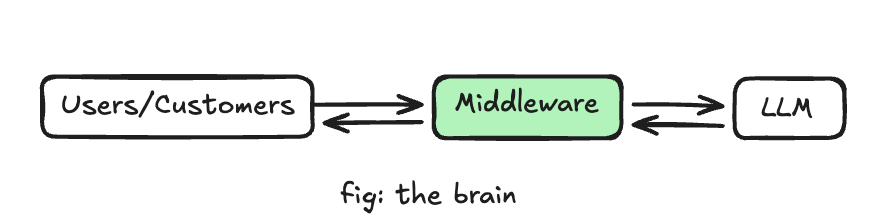
Scaffolding the Prototype
To prove this wasn’t just napkin math, I needed a v1. I avoided the heavy enterprise tools and optimized purely for speed and local execution.
The Stack
Engine: Qdrant. It’s Rust-based, blazingly fast, and handles high-concurrency easily.
Embeddings: I initially grabbed SentenceTransformers, but it was too heavy. I switched to FastEmbed—it’s quantized by default, CPU-friendly, and doesn’t require a GPU.
Backend: FastAPI. The gold standard for async Python microservices.
The Bottleneck Discovery
When I ran the first benchmarks, the numbers didn’t add up. The database search was nearly instant (<5ms), but the total request latency was lagging.
I realized the bottleneck wasn’t the database—Qdrant was bored. The bottleneck was the CPU. Generating the embeddings (converting text to numbers) was blocking the Python main thread.
The Fix
I couldn’t let the embedding process freeze the API. I moved the embedding generation to a separate thread pool using loop.run_in_executor, ensuring the main event loop stayed free to handle incoming traffic—I can do better.
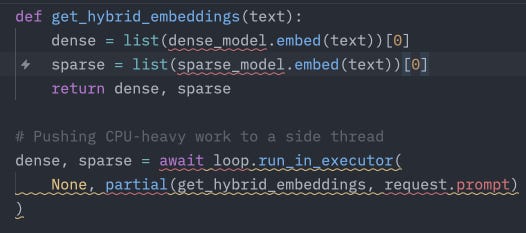
Note: Dense vectors are good for semantic matching where as sparse vectors are good for keyword matchingDeep Dive
The prototype worked, but as I looked at the memory usage, I saw a wall coming—A MacBook Air M1 definitely does the justice.
The Math Problem
Vectors are heavy. I am using bge-small-en (384 dimensions). Here is some math again:
A standard float32: 384 dimensions × 4 bytes = 1,536 bytes per vector.
Scale: If I cache 10 million user queries (a reasonable target for a mid-sized product), I need ~15 GB of RAM just for the vectors.
That forces me onto expensive memory-optimized cloud instances. I wanted this to run on a cheap generic instance.
The Hypothesis
Do I really need 32-bit floating-point precision (e.g., 0.12345678) to find a similar sentence? Or can I crush that number into an 8-bit integer (e.g., 12) and still get the right answer?
This technique is called Scalar Quantization. It promises a 4x reduction in memory (1 byte vs 4 bytes), but the risk is “Quantization Loss”—basically, making the AI dumber.
The Experiment
I didn’t trust the marketing brochures. I wrote a simulation script to generate 10,000 synthetic vectors, run a “Ground Truth” search in float32, and compare it against a “Compressed” search in int8.
The Results were shocking
Memory Savings: 75% (from 1.5KB —> 384B per vector).
Recall@10: 100%.
I lost 75% of the data precision, yet the Top 10 search results were identical.
Why? The Blessing of Dimensionality.
In 384-dimensional space, points are so sparsely distributed that they are effectively “floating alone in deep space”
Even if compression nudges a vector slightly (the quantization error), it’s still miles away from its nearest neighbor. The ranking remains stable.
The Unlock
By flipping one switch in Qdrant (ScalarType.INT8), I turned a $1,000/month infrastructure problem into a $150/month problem
The “Noisy Neighbor” Problem aka Multi-Tenancy
With the engine optimized for RAM and CPU, I hit the biggest hurdle: Privacy.
If Company A asks my AI about their Q3 financial projections, and Company B asks a similar question 5 minutes later, my Semantic Cache would normally say: “Hey! I found a match!” and serve Company A’s secret data to Company B.
That is a privacy lawsuit waiting to happen and remember my wallet is already down the drain
The Naive Solution
Spin up a separate Qdrant collection (or even a separate database container) for every single customer.
Pros: Perfect security.
Cons: Operational nightmare. If I have 1,000 customers, I have 1,000 databases to manage. It doesn’t scale.
The “ideal” Solution
Logical Partitioning I decided to keep one massive shared index (for performance and cost) but enforce Row-Level Security at the vector engine level.
The Implementation
I treated tenant_id not just as metadata, but as a hard filter. In Qdrant, I configured the search query to apply a “Must Match” filter before it even calculates similarity.
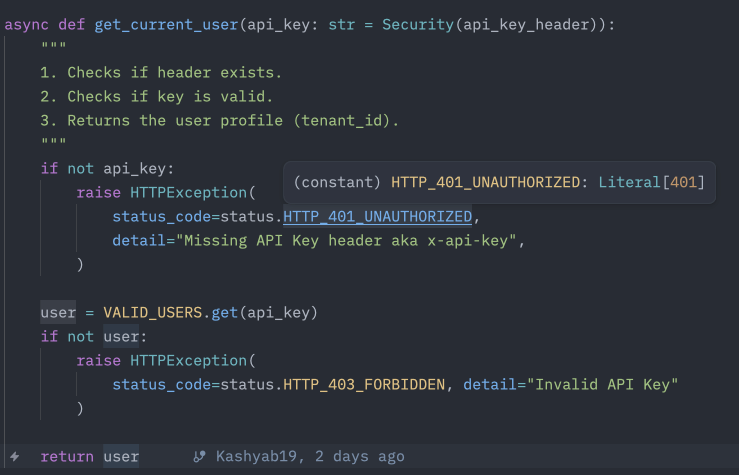
Example
I verified this with a Red Team test.
Gold Tenant asks: “What is the secret code?” → Cached.
Silver Tenant asks: “What is the secret code?”
Expectation: Cache Hit (Similarity 1.0).
Reality: Cache Miss.
The database ignored the Gold Tenant’s vector because the tenant_id didn’t match.
This architecture allows me to host 10,000 companies on a single $50 server, with near zero risk of data leakage.
Conclusion: The Pivot to Agent Memory?
Building CacheFlow taught me that the bottleneck in AI isn’t the model, it’s the surrounding infrastructure. We are treating LLMs like stateless functions, but they need state.
A semantic cache is just the beginning.
If I can stop a human from asking the same question twice...(which I can’t, a bummer)
Can I stop an Autonomous Agent from making the same mistake twice?
That is the next evolution. Pivoting this infrastructure from a caching layer for chatbots to a Shared Memory for Agent Swarms
If you are building agents and want to stop burning money on redundant loops, check out the repo below: https://github.com/Kashyab19/cache-flow
(Disclaimer: This is not a production-grade app and it’s still a WIP. DMs open to chat if you are working on something exciting)
Ad: If you read till this part, here is a small affiliation to my portfolio: https://kashyab.xyz
I post about my progress, ideas and thoughts on Twitter regularly and here are the tweets about this project if you are interested:
Deep diving into Scalar Quantization: https://x.com/karpathism/status/1999566442685944126?s=20