The Machine Inside The Machine
If you have ever handed a task to an AI agent and wondered what actually happens next, this one's for you.

100 GB out of 256. That’s how much of my disk Docker images were quietly eating.
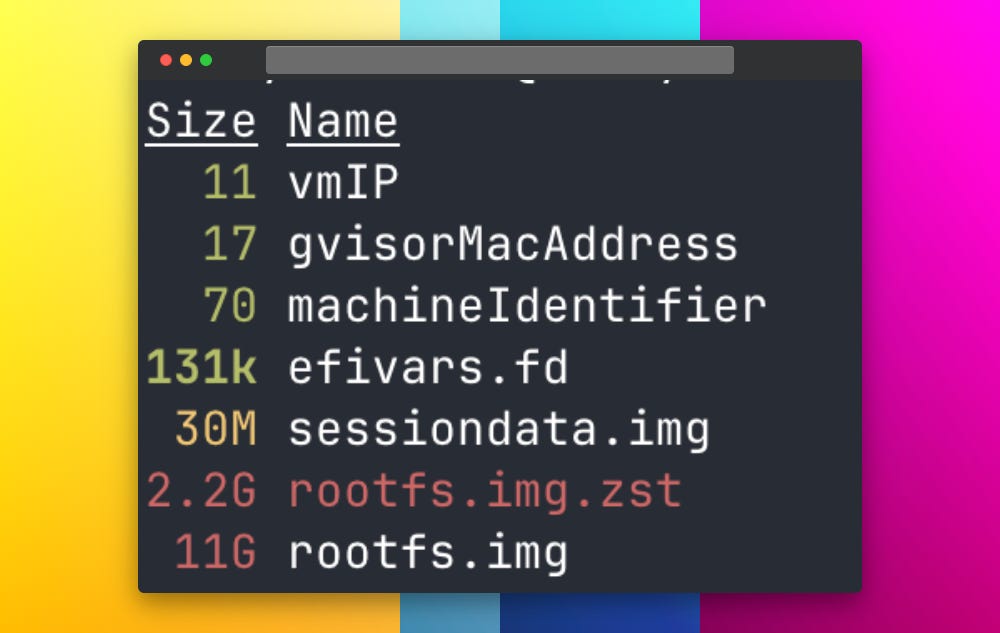
So I did the responsible thing and started purging. While I was at it, I ran a deeper disk analysis to see what else was hiding. That’s when I found it: a 10 GB disk image I didn’t remember creating. A virtual machine.
At that point I stopped caring about reclaiming space. I wanted to know what this thing was.
It turned out the VM had been spun up by the dearest Claude. Which left me with a driving question I couldn’t let go of: Why does Claude need a virtual machine, when it runs every command directly on my machine? (I like watching Claude execute different commands)
What’s Inside The Box?
So what does it take to build a computer that doesn’t physically exist? The same things a real one needs, it turns out, and every single one of them was sitting in that folder.
There was a 10 GB file acting as the machine’s hard drive, and next to it a compressed master copy it could reset itself from whenever it wanted a clean slate. There was a small file holding its boot settings, the digital equivalent of the firmware that wakes a real PC.
There was a unique identity, its own network address, and even its own hardware-style network fingerprint. And finally, tucked inside, the one thing all of this existed to run: a Linux build of Claude itself.
Nothing here was improvised or hacked together. It was a complete, self-contained machine, assembled quietly on my disk from parts that each answered a basic need.
The only question left was why any of it needed to be there at all.
Why do we need a virtual machine?
When you run Claude in your terminal, you are sitting right there. Every time it wants to do something risky, delete a file, run an unfamiliar command, it stops and asks you first. You are the safety net.
Cowork removes that net on purpose. The entire point is that you hand it a task and walk away, letting it work on its own for minutes or hours without babysitting. But that raises an uncomfortable question: if no one is watching, what stops an autonomous agent from making a mistake it can’t take back on your actual machine? The answer is that you don’t let it near your actual machine. You give it a sealed room instead. Inside that room it can install anything, run anything, break anything, and the worst it can do is break the room. When the session ends, the room is thrown away and your real files, your credentials, and your system were never in reach. That is why the VM exists. It isn’t there despite the agent’s freedom. It is the very thing that makes that freedom safe to give.
Breakdown
The Disk
Root File System Image : rootfs.img (10 GB)
The virtual machine’s hard drive. A complete Ubuntu Linux system lives here: the operating system, the tools, and Claude itself. This is the “computer” part of the computer.
Root Filesystem Image with Zstandard compression: rootfs.img.zst (2 GB)
A compressed master copy of that hard drive. Think of it as the factory-sealed original. Whenever Cowork needs a clean machine, it unpacks this. It means the base system can always be restored to a known-good state.
sessiondata.img
A small, separate scratch disk. Your actual work and any changes the agent makes land here, not on the master image. When the session is done, this is what gets thrown away. The master stays pristine.
The Hardware It Pretends To Have
Extensible Firmware Interface: efivars.fd
The machine’s boot firmware settings. This is the software version of the chip that wakes a real PC when you press the power button. Its presence is the giveaway that this thing genuinely boots up like a physical computer, not a script.
machineIdentifier
A unique ID for this specific virtual machine. Its exact format is a fingerprint left by Apple’s own Virtualization framework, which is how we know this is a real, hardware-level VM and not a container or a sandbox trick.
vmIP and gvisorMacAddress
The machine’s network identity: its own internal IP address and a hardware-style network address. The VM gets its own private network, kept separate from your real one, so its internet access can be watched and controlled.
The Tenant
The claude binary (Linux build)
The one thing all of the above exists to host. This is Claude Code itself, rebuilt to run on Linux, living inside the box. Same agent you use in the terminal, just relocated into the sealed room.
Thoughts
I started out trying to reclaim disk space. I ended up looking at what safe AI actually looks like when it stops being a slogan and becomes a design decision. We talk about AI safety in big abstract terms: alignment, oversight, control. But here was a version of it I could hold in my hands, a 10 GB file on my own laptop.
The idea behind it is simple and quietly powerful. If you are going to let an agent act on its own, you do not make it promise to behave. You put it somewhere it cannot do harm in the first place. You give it a sealed room, let it do real work inside, and make sure the worst possible outcome is a room you can throw away. That is what safety looks like at the level of engineering rather than intention. Not a smarter agent you trust more, but a boundary that means you do not have to. As we hand these systems more freedom, this is the trade that matters: every bit of autonomy we give an agent has to be matched by a wall that contains it.
Anthropic built one of those walls on my machine, and I almost deleted it while cleaning up Docker.
If you enjoyed this, you might also like:

